Device studies API

Send studiesstraight to the order.

ZunovaMD gives each clinic device its own key. Your device or portal reads the worklist of signed orders, then sends each study back with the order id, its findings and up to 10 files of 10 MB each. The study lands on the patient's order, and the clinic reads it in ZunovaMD. Real patient data flows only after a signed business associate agreement (BAA) covers your connection and ZunovaMD records it.
ZunovaMDSynthetic data
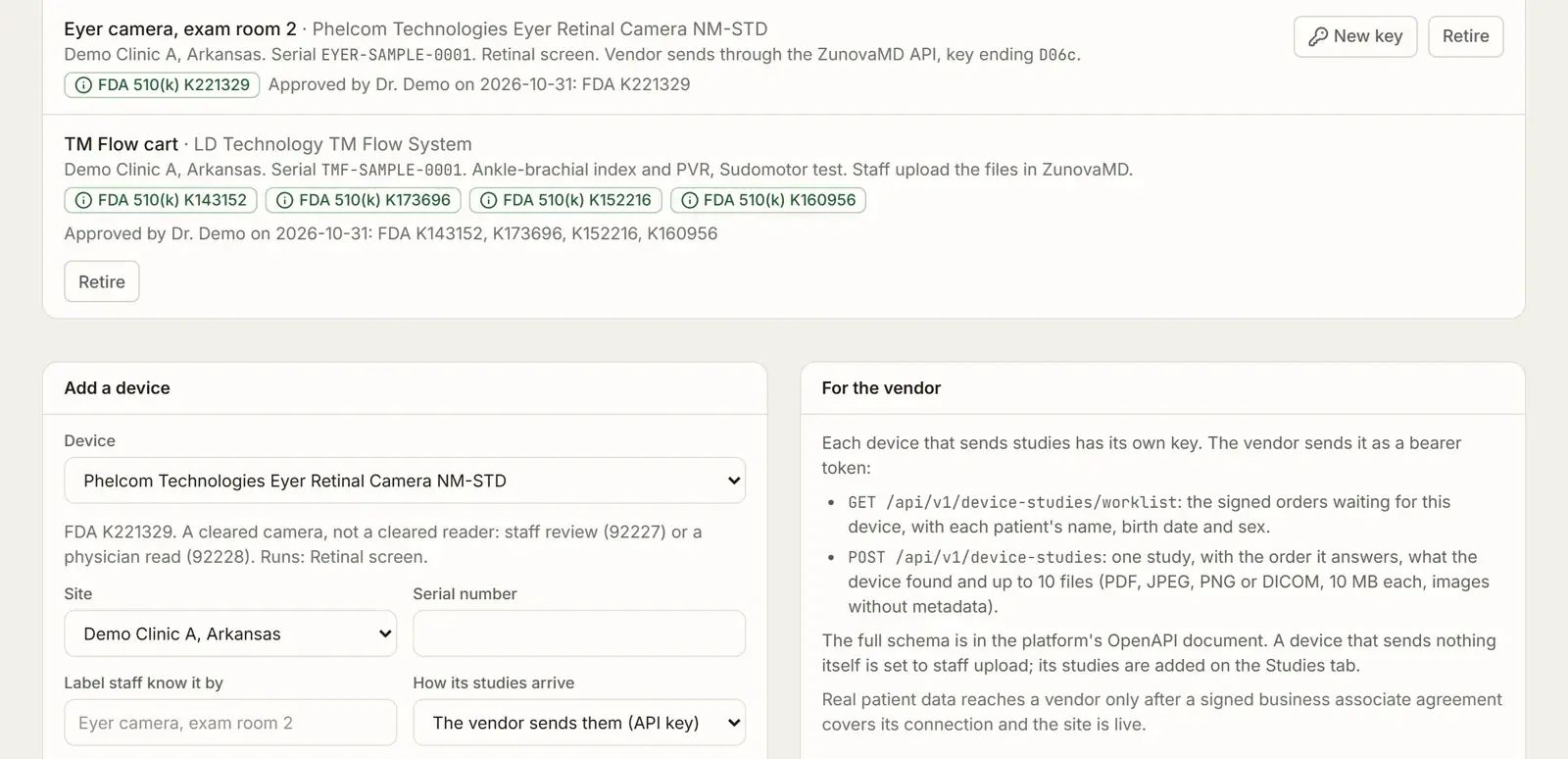
The clinic's study devices in ZunovaMD, each with its own key and connection state, on synthetic data.
Each device that sends studies gets its own key, and the screen shows how each device's studies arrive.

From the device,to the patient's order.

  1. Key

    The clinic adds your device

    ZunovaMD issues one key for that device and shows it once. The clinic gives it to you or enters it on the device.

  2. Worklist

    Orders show on the device

    A clinician signs the order in the visit. It appears on the worklist of your device at that site, with the patient's name and birth date.

  3. Study

    Send the study back

    Your device or portal posts the study with the order id, its findings and its files. A retry files once.

  4. Read

    The clinic reads it

    A staff member or physician reads it in ZunovaMD. The read files on the order and sets the billing code.

Two calls,one key per device.

Every call sends the device's key as a bearer token. ZunovaMD keeps only a hash of it. A clinic can replace the key at any time, and a retired device's key stops working.

Read the worklist

The signed orders at the device's site, for the studies it runs, that no study has answered yet. Show the operator the patient's name and birth date, and keep the order id.

GET /api/v1/device-studies/worklist
Authorization: Bearer <the device's key>

{
  "device": { "label": "Retinal camera, exam room 2", "kinds": ["retinal_screen"] },
  "orders": [{
    "orderId": "6a1e…",
    "kind": "retinal_screen",
    "patient": { "name": "June Sample", "birthDate": "1938-02-25", "sex": "F" }
  }]
}

Example with synthetic data.

Send one study

The study with its order id, what the device found and its files. A study needs at least one file or some findings. One without an order still files and waits for a person to match it.

POST /api/v1/device-studies
Authorization: Bearer <the device's key>

{
  "vendorStudyId": "CAM-2026-000123",
  "kind": "retinal_screen",
  "orderId": "6a1e…",
  "performedAt": "2026-11-18T14:22:05-06:00",
  "findings": { "summary": "Both eyes imaged; images gradable." },
  "files": [{ "name": "OD.jpg", "contentType": "image/jpeg", "data": "<base64>" }]
}

Example with synthetic data.

Files,checked before they are stored.

  • Up to 10 files of 10 MB each: PDF, JPEG, PNG and DICOM.
  • A PDF must start as a PDF, and a DICOM file must carry its DICOM marker. ZunovaMD checks both.
  • JPEG and PNG images must have their EXIF and GPS metadata removed. An image that still carries a location is refused.
  • ZunovaMD stores files as sent and never reads an image. Your report and your cleared AI's result are what the clinic sees.

AI reads,named camera only.

ZunovaMD codes an autonomous AI read as 92229 only when the AI's FDA record names the camera the study came from: LumineticsCore with the Topcon NW400; AEYE-DS with the Topcon NW400 or the Optomed Aurora. For any other pairing, send the AI's result in the findings and a person reads the study.

Test first,then live.

Until a signed business associate agreement (BAA) covers your connection and ZunovaMD records it, the API takes only synthetic studies, on a test site. Real patient data also needs the clinic's site to be live. A call with real data before then is refused with a clear reason.

How clinics use device studies in ZunovaMD

Ready to build?Tell us about your device.

We check each device's FDA record on accessdata.fda.gov, then email you or set up a call about what connecting it takes.

Apply as a device maker

Vendor questions,answered plainly.

What your engineers ask before they build: retries, studies without an order, the schema.

Talk with our team

Building for clinics?Start on a test site.

Tell us the device and the clinics you serve. We send the full guide and the OpenAPI document, and you build against synthetic studies until a BAA is in place.